


Why Human–Computer Interaction Is Becoming a Key Field in Modern Computin
Technology Does Not Operate in a Vacuum
Speed, functionality, and accuracy are commonly regarded as the main signs of technological progress. Yet even a technically sophisticated system can be inconvenient, confusing, or inaccessible. An application performs its operations flawlessly, but the user cannot find the function they need. An online form saves information correctly but does not explain why an application was rejected.
These situations show that the quality of a digital system depends not only on what it can do, but also on whether people can use its capabilities. These are precisely the questions explored by Human–Computer Interaction (HCI), an interdisciplinary field that studies how people interact with computer systems and how that interaction can be improved.
ACM SIGCHI brings together researchers in computer science, engineering, psychology, design, and the social sciences [1]. This combination is no coincidence: evaluating technology requires an understanding of both how systems work and how people behave.
Three Related Concepts

The boundaries between HCI and Human-Centered Computing (HCC) are not rigid. Human-Centered Design (HCD) is not a competing discipline but a design approach whose principles are described, among other sources, in ISO 9241-210 [3].
From Command Lines to Intelligent Interfaces
Early computer systems required users to know specific commands. Graphical interfaces made interaction more intuitive: windows, icons, menus, and pointers enabled people to operate computers without memorizing numerous instructions.
Research at Xerox PARC in the 1970s played a significant role in the development of graphical interfaces. Ideas demonstrated in experimental systems later became widespread in personal computers. Touchscreens, mobile applications, and voice control subsequently expanded the ways people interact with technology even further.
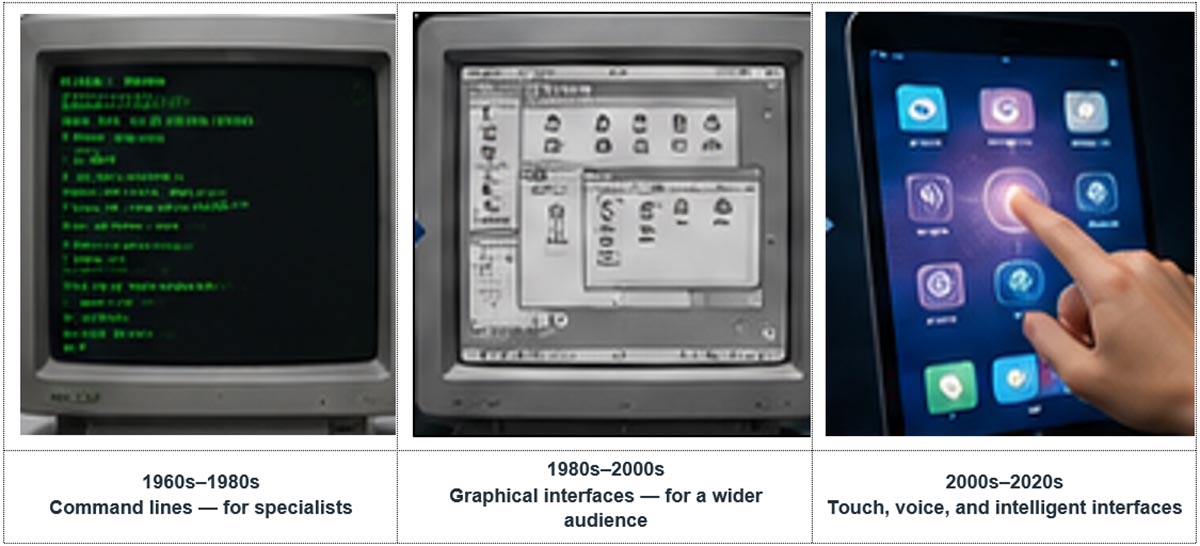
Today, AI-powered dialogue adds another option: users describe a goal, and the system proposes text, a recommendation, or a sequence of actions. Yet a new interface does not automatically make a system easy to use. Even an application with dozens of features can be difficult to navigate if users cannot locate the action they need.
Why Usability Is More Than Appearance
An interface is the visible part of a system. Interaction also involves user expectations, sequences of actions, feedback, errors, and outcomes. When people must remember numerous intermediate steps, constantly look for guidance, and check whether they have understood a screen correctly, cognitive load increases—the mental effort required to complete a task.
Cognitive load is not always harmful: genuinely complex tasks may demand concentration. The problem arises when the interface itself, rather than the task, creates unnecessary effort. Good design therefore reduces avoidable complexity and helps people focus on their goals.
What Don Norman Explained
In The Design of Everyday Things, Don Norman explains how signifiers, feedback, and a clear mental model of a system help people use everyday objects and digital products [2].
Don Norman’s central insight: clear signifiers, timely feedback, and predictable system behavior help people achieve goals and avoid mistakes.
Consider an online registration form. The submit button should be easy to find; an error message should identify the field that needs correcting; and the confirmation should clearly indicate that the application was received. These details may seem minor, but they help users understand the system’s state and remain in control of their actions.
An especially important distinction is the difference between user error and design error. If someone repeatedly clicks the wrong button, the cause may not be carelessness but poor placement, unclear labels, or missing feedback. This does not mean users never make mistakes. It means good design should anticipate predictable errors and help people recover from them. When mistakes recur, it is worth examining not only user behavior but also the form itself.

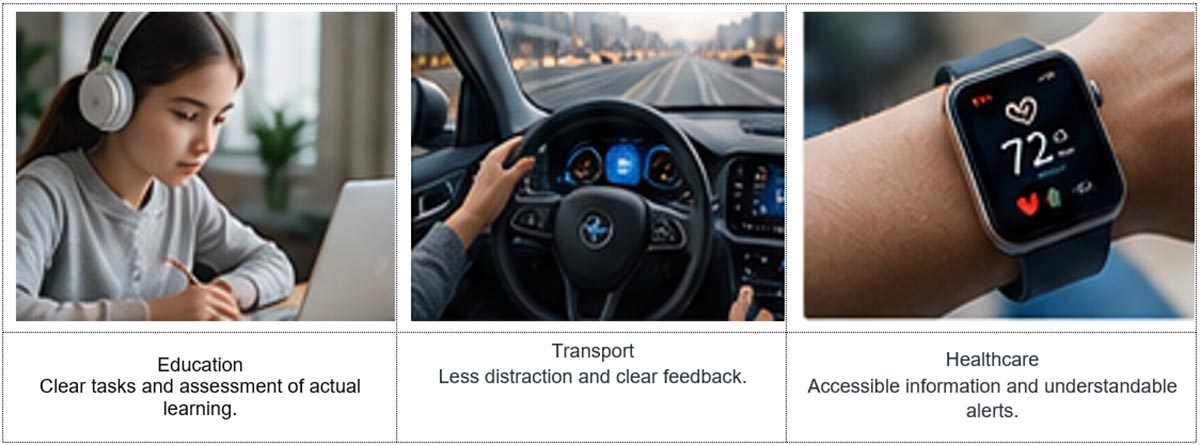
Norman’s principles apply far beyond household objects: to banking apps, digital school records, educational platforms, and medical information systems. The greater the consequences of an error, the more important clear actions and understandable outcomes become.
From Usability to Human Needs
Human-centered design begins with studying people, their tasks, and the context in which they act. ISO 9241-210:2019 describes principles of this approach, including understanding the context of use, involving users, evaluating solutions with them, and improving designs iteratively [3].
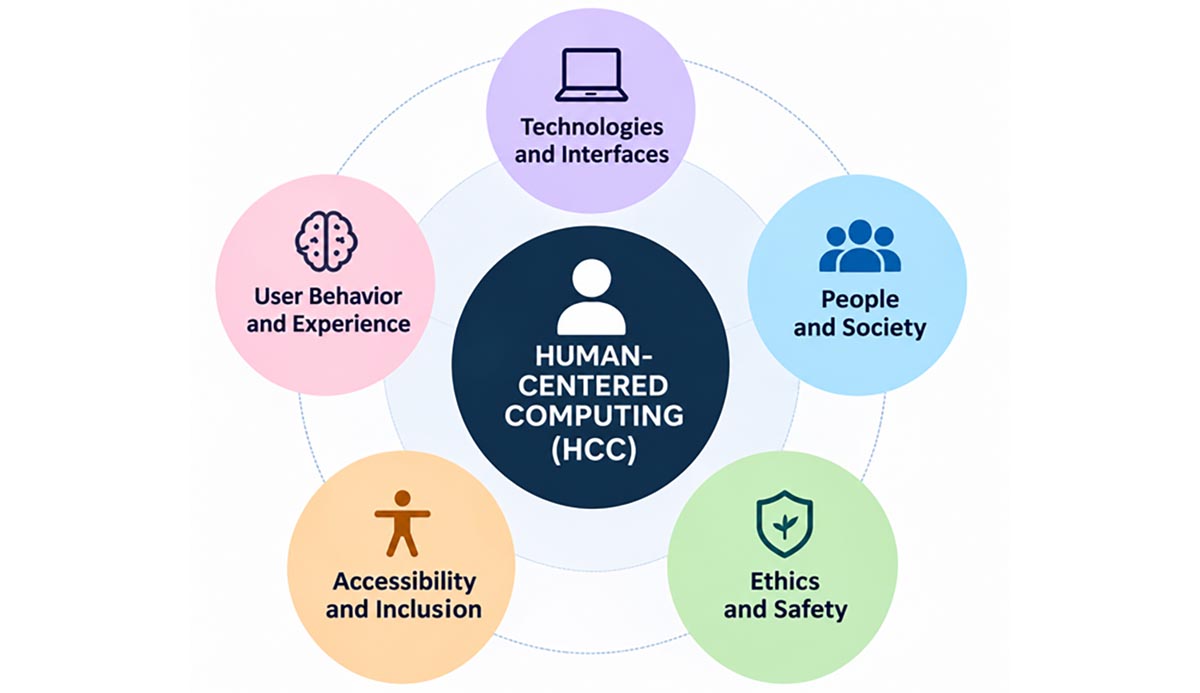
This means that interviewing users once is not enough to declare a problem solved. Assumptions must be tested in real scenarios, and test results may require a reconsideration of the original design.
For example, an educational platform may define success by the number of completed exercises. For students, what matters more is whether they understand the topic and can apply their knowledge independently. If a system rewards only quick answers, it risks optimizing measurable activity rather than actual learning.
Quality criteria must therefore be connected to human goals. Sometimes a system’s value is better demonstrated not by click counts or speed of navigation, but by fewer errors, greater accessibility, and the ability to complete a task without assistance.
As digital systems become integral to education, healthcare, and public services, usability is no longer merely a matter of convenience. A confusing interface can restrict access to an essential service even when the underlying technology works perfectly. HCI therefore matters not only for improving individual screens but also for assessing how accessible technological progress really is.
Three Areas Where This Matters Most
What Changes with the Arrival of AI
A traditional interface usually offers users a defined set of functions. An AI system may independently produce a recommendation, explanation, or prediction. People therefore need to understand not only how to obtain an answer but also how much they can trust it.
The Stanford Institute for Human-Centered AI emphasizes developing AI that enhances human capabilities [4]. In practice, this requires transparent communication of limitations, opportunities to verify results, and meaningful human control wherever errors could have serious consequences.
Conclusion: Technology Should Help People Achieve Their Goals
The history of interfaces is not simply a succession in which one way of controlling a computer replaces another; it is an expansion of interaction possibilities. Commands, graphical elements, touch, and voice continue to coexist. Human-centered design does not reject technical efficiency: it helps determine which forms of efficiency are genuinely useful.
HCI and HCC connect computer science with the study of human behavior. In the age of intelligent systems, this relationship becomes especially important. Building technology capable of performing an action is not enough. We must also determine whether it helps people, avoids unnecessary barriers, and allows them to retain control over outcomes.
That is why the evolution of interfaces is more than a history of new devices and input methods. It is also the story of a gradual change in how we judge the quality of digital technology.
This article is part of the series “HCC/HCI: Technology Centered on People.” Other articles explore the evolution of human-centered technologies, human interaction with artificial intelligence, and the interdisciplinary skills of IT professionals. Each article can be read independently.
References and Further Reading
[1] ACM SIGCHI. About SIGCHI. https://sigchi.org/about/
[2] Norman, Don. The Design of Everyday Things. Revised and Expanded Edition. Basic Books, 2013.
[3] ISO 9241-210:2019. Ergonomics of human-system interaction — Part 210: Human-centred design for interactive systems. https://www.iso.org/standard/77520.html
[4] Stanford Institute for Human-Centered AI. About / Mission. https://hai.stanford.edu/about/
[5] Computer History Museum. Xerox Alto and the evolution of graphical interfaces. https://computerhistory.org/

About the Author
Daria Dmitriyeva is an International Baccalaureate student at ADA School. Her interests include computer science, Human–Computer Interaction and Human-Centered Computing (HCI/HCC), and applications of artificial intelligence. She participates in international academic Olympiads, educational projects, and volunteer STEM initiatives.